Godot 4.8 beta 1 needs .NET 10, and a few things break
Godot 4.8 is feature-frozen. What's new, what can break your project, and how to test the beta on a branch without risking the build you ship.
Godot 4.8 is now feature-frozen. Beta 1 came out on 15 October, so from here the team is fixing regressions, not adding features. It brings a trail node, texture streaming, better lighting and touch-friendly text controls. It also needs .NET 10 for C# projects, and changes a handful of behaviours that can break older code.
What’s new
Since 4.7 stable, 340 contributors have landed 1,523 fixes, according to the Godot team. These are the changes most people will notice.
| Change | What it means for you |
|---|---|
| Trail3D node | Trail effects without building the mesh or setting UVs yourself. |
| Texture streaming | Godot loads only the mipmap level a texture needs for its distance from the camera. That cuts video memory use, especially in large, open levels. |
| Screen-space contact shadows | A new option on the Environment and on DirectionalLight3D adds small shadow detail where objects meet. |
| Multi-bounce ambient occlusion | More accurate darkening in corners and crevices. |
| Directional specular in lightmaps | Baked lighting can now show highlights that change with the viewing angle. |
| Visual shader node groups | Group nodes into reusable blocks, so big shader graphs are easier to read. |
| Touch support in text controls | TextEdit and CodeEdit get inertial scrolling and double-tap text selection. TabBar gets similar touch handling. |
| Editor main screens are docks | 2D, 3D and Script can be closed or floated like any other dock. The Game screen can’t float. |
| Android SDK set-up | The editor can download and manage the Android and Java SDKs for you, from Export Presets or Project > Setup Android Build. |
A few smaller changes are worth a mention. Alpha-tested materials no longer look rough at long distances when textures drop to smaller mip levels. The code completion popup now scrolls by touch. Jolt Physics moves to version 5.6.0, and Label and RichTextLabel can now shrink text to fit.
What breaks
Two platform changes come first, then the items Godot lists as compatibility breaks. Go through these before you open a real project in 4.8.
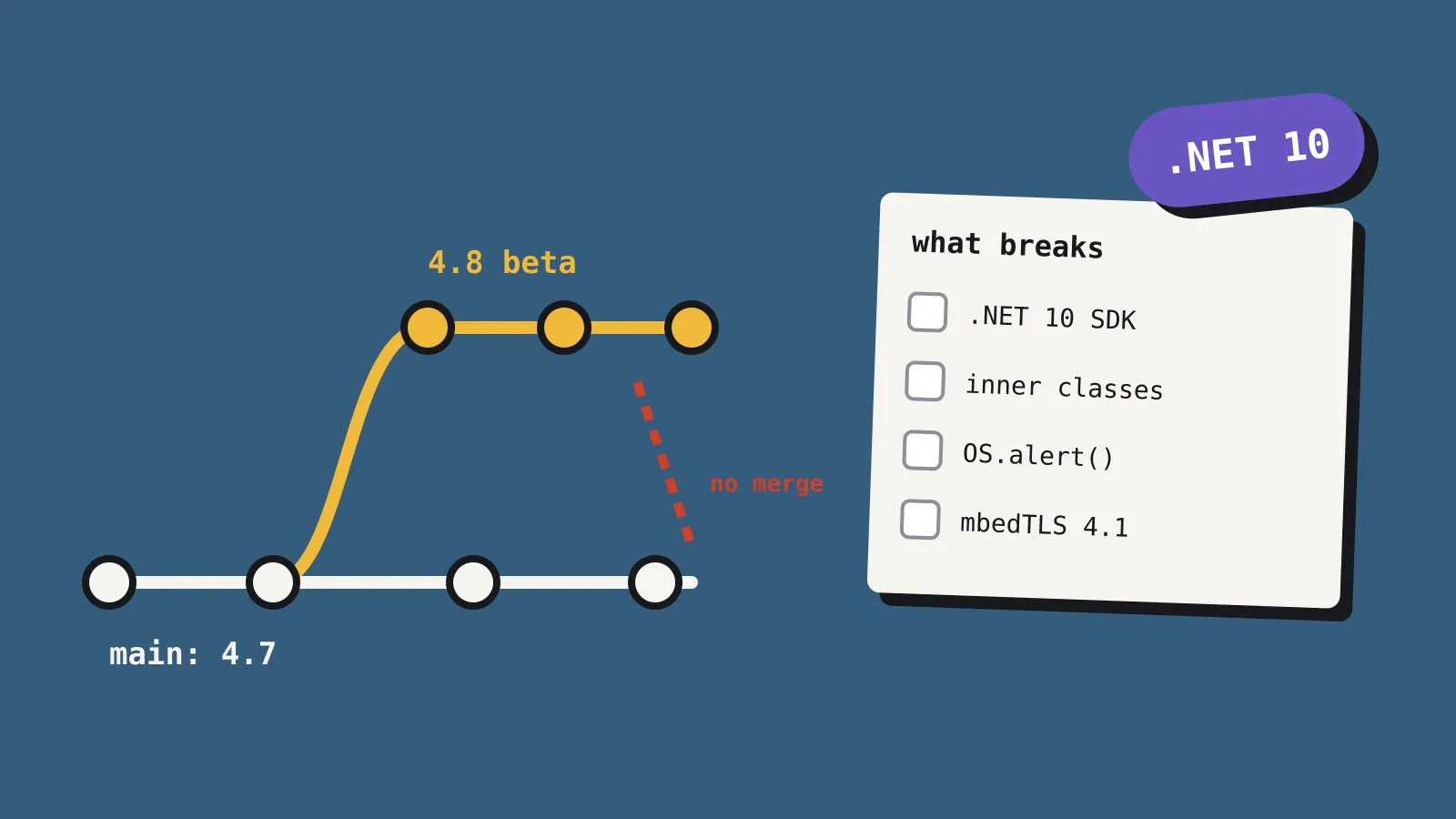
- C# needs .NET 10. The .NET build now requires .NET 10 or newer, up from .NET 8. Install the .NET 10 SDK and update your project’s target framework before you test. Microsoft ends support for .NET 8 on 10 November 2026, so this move was coming either way.
- macOS downloads are split by chip. Official macOS builds now ship separately for Apple silicon and Intel, which makes them smaller. A universal package is still an option.
- GDScript inner classes. A script can no longer inherit from its own inner class. If you used that pattern, move the inner class to its own file.
- Local debugger in release exports. It now fails in release builds. Remove any code that relies on it outside debug builds.
- Controllers on unfocused windows. New projects ignore controller input when the window isn’t focused. Existing projects keep their setting, but check it if you start fresh.
- OS.alert() on Android now blocks until the player closes it. Don’t call it in the middle of gameplay.
- LookAtModifier3D.is_interpolating() used to return the opposite of what it should. That’s fixed, so flip any code that worked around the old behaviour.
- Bone follower classes have physics interpolation turned off by default, and show a warning.
- Script-only enter_world callbacks in 3D, which were undocumented, have been removed.
- mbedTLS 4.1.0. The bundled TLS library has been updated. If your game does its own networking or encryption, retest it.
The full list lives on GitHub under the “breaks compat” label for merged 4.8 pull requests. Check it if you use anything unusual, such as custom export options or dialog titles, which both changed.
How to test it safely
Betas are for testing, not shipping, and the Godot team tells you to make frequent backups. This is how we’d go about it.
- Commit everything first. Put your project in version control, then make a new branch for the 4.8 test.
- Install 4.8 alongside 4.7. Godot doesn’t need installing, so keep both editors in separate folders. Get beta 1 from the 4.8 beta 1 download page. There are standard and .NET builds for Windows, Linux and macOS, plus export templates.
- Open the branch in 4.8 and run it. Newer Godot versions can change how scenes and resources are saved. Treat the branch as one-way, and don’t merge it back while you’re still shipping on 4.7.
- Test your export targets. Pay most attention to Android, where the new SDK manager and the blocking alert change both apply.
- Report regressions. If something that worked in 4.7 breaks in 4.8, search Godot’s GitHub issues and file a report if nobody has. Regressions are what the team most wants to hear about at this stage.
You can also try the web editor, XR editor or Android editor without installing anything. Pre-release Android editor builds require joining Godot’s testers group first.
When is 4.8 stable?
The Godot team hasn’t given a date. Stable comes once the regressions on its GitHub project board are cleared. Expect more betas, then release candidates, before that.
Should you care?
| You are | Our verdict |
|---|---|
| Shipping a game on 4.7 soon | Stay on 4.7. Don’t change engine versions close to launch. |
| Using C# in Godot | Install .NET 10 now and test on a branch. This is the change most likely to stop your project building. |
| Making a 3D game with large levels | Try texture streaming and contact shadows on a branch. They could save memory and add detail. |
| Building for Android or touch devices | Worth testing early. Touch controls and SDK set-up both improve, and OS.alert() behaves differently. |
| Starting a new project | Start on 4.7 stable, and move up when 4.8 stable lands. |