Rescue your web-made MetaHumans before February
Epic shut the MetaHuman Creator web app on 5 November, and you have 90 days to pull your characters out before Bridge stops downloading them.

Epic closed the MetaHuman Creator web app on 5 November 2026. That starts a 90-day window to download the characters in your web gallery. By our count, 90 days from 5 November lands on 3 February 2027. Epic’s announcement gives the 90-day figure but not a calendar date, and it says anything left after the window is deleted. If you built a character in the browser and never brought it into a project, this is the job to do this month.
What closed and what still works
Epic announced the shutdown on its Unreal Engine forums on 5 March 2026 and ran it in three stages. On 5 April it removed the option to open sessions for Unreal Engine 4.27, 5.0 and 5.1. On 5 June it did the same for 5.2 to 5.4. On 5 November the last version, 5.5, went too, along with all access to the web app itself.
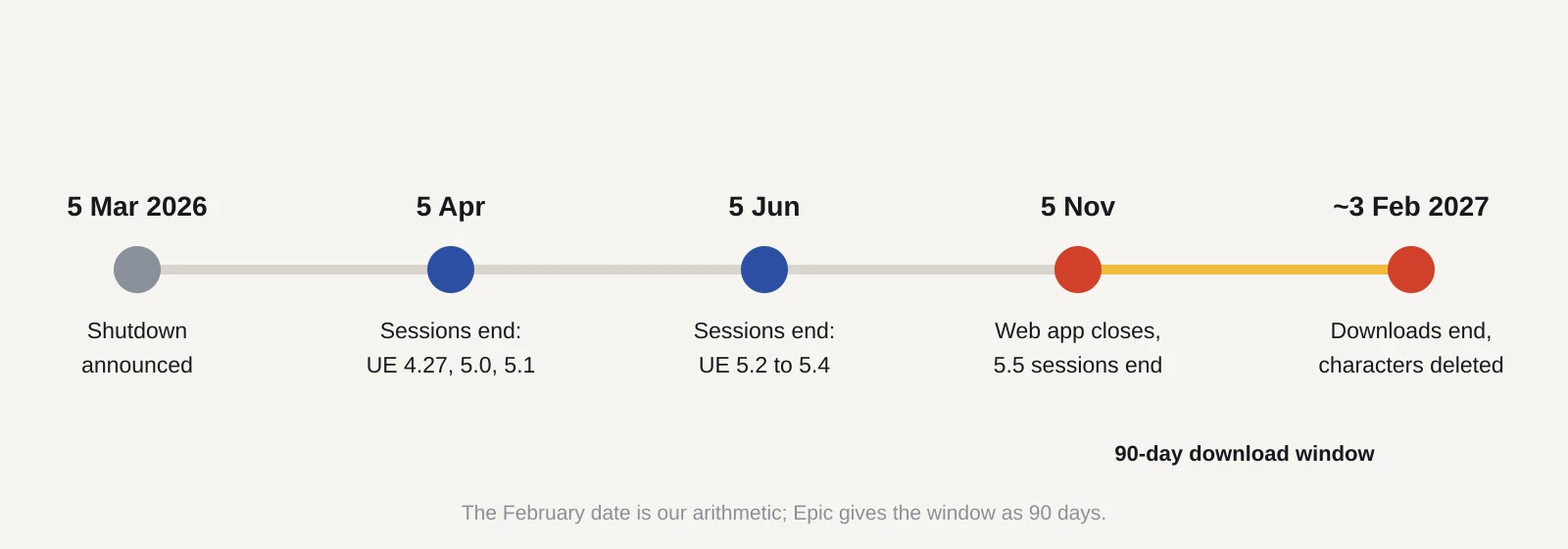
What still works for now is downloading. Quixel Bridge, Epic’s asset browser that runs inside the editor and as a standalone app, can still fetch characters from your gallery. So can the MetaHuman Importer in UEFN, the Fortnite editor. Both lose that ability when the 90 days end, according to the forum post.
The replacement is MetaHuman Creator built into Unreal Engine. It first shipped with UE 5.6 in June 2025, when MetaHuman left early access. The in-engine version removes the old cloud sessions and wait times, though it still needs an internet connection for autorigging and texture synthesis, Epic says. The current release is 5.8, with the 5.8.4 hotfix out in October.
What it means for a solo dev or small team
If your MetaHumans already live in a project as imported assets, you are probably fine. Nothing in the announcement touches files already on your drive. The risk sits with characters that exist only in the web gallery, and with anything you planned to keep tweaking.
Epic splits your choices three ways. If you no longer need a character, do nothing. If you only want to use it as it is, download it with Bridge into your Unreal version. If you want to keep editing it, you need to migrate it into the in-engine Creator. Migration produces a MetaHuman Character asset: an editable file inside your project that holds the same face and body settings you had on the web.
There is a catch with versions. The migration guide requires a character that is compatible with UE 5.5. Older characters had to be upgraded inside the web app first, and the web app is now gone. Characters made for 4.27 could never be upgraded or migrated at all, per the announcement. If you missed the upgrade step, see the fallback in step 7 below.
The licence is also friendlier than it was when many of these characters were made. Since the June 2025 release, MetaHumans fall under the standard Unreal Engine EULA. Epic’s licence page says they are free for anyone earning under US$1 million in revenue and can be used with any engine or creative software. CG Channel reported at the time that this covers games built in Unity or Godot, and that selling MetaHuman characters and clothing on marketplaces is allowed. So a rescued character is not locked to an Unreal project.
What to do now: the migration steps
These steps follow Epic’s MetaHuman Creator migration guide for UE 5.6 and 5.7. We have not seen a 5.8 version of the steps, so treat menu names as close rather than exact.
- Install or open a UE 5.6 or newer project. Enable the MetaHuman Creator plugin under Edit > Plugins.
- Open Quixel Bridge from the Window menu inside the editor and sign in. Epic says the standalone Bridge app will not work for migration.
- Go to the MetaHumans section and find your character. Presets and custom characters both appear here.
- Set the quality level to Cinematic (Complete) and click Download. Do one character at a time if your connection is slow.
- When the download finishes, keep the character selected and click Add.
- Bridge asks whether to Import, Migrate, or Import and Migrate. Choose Import and Migrate. Plain Import gives you UE 5.5 assets you cannot edit in the new Creator. Plain Migrate gives you the editable Character asset but drops your grooms (the hair, brows and lashes). Import and Migrate reapplies grooms automatically. The result lands in /Game/MetaHumans under the same name it had on the web.
- If a character was never upgraded to 5.5, try two things. First, download it with Bridge into the older engine version it was built for, which the announcement says still works until the deadline. Second, an Epic staff reply on the thread suggests exporting the character’s DNA file from standalone Bridge, then using Conform > Import DNA in the 5.6 or newer Creator. That recovers the face shape. The body gets rebuilt with the new tools, and the .mhb file alone is not enough.
Once it is in, check a few things. Clothing does not carry over, so you will need to import it and assign it by hand. Epic says it plans to put remaining legacy clothing on Fab, its asset store, but has not given a date. Until then, staff suggest dragging imported clothing meshes into the hair and clothing tools, and switching off wardrobe validation if it complains. Expect the face to look a little different, because the newer engine renders it with updated tech. One user on the thread reported greyish specks on freckles after migrating, with no fix posted.
Plan for hardware, too. One forum user with an 8GB RTX 3050, which they said meets Epic’s documented minimum, still struggled to rig a character in 5.8. Another reported crashes when assembling a third or fourth MetaHuman in a single project. If you have several characters, migrate each into a small scratch project first, then move the finished assets into your game.
Finally, back up. A community member on the thread points out that the .mhb file does not capture every dependency. Copy the whole /Game/MetaHumans folder, or the exported assets, to storage outside your project. If you need older engine versions, a community plugin on Fab claims to downgrade 5.6 MetaHumans. It is not an Epic tool, so test it on a copy.
We would aim to finish this before the end of January. Downloads are large at Cinematic quality, and a deadline that falls on a Wednesday in early February leaves little room for a failed transfer.
Sources
- MetaHuman Creator Web Application is being Discontinued (Unreal Engine forums)
- MetaHuman Creator migration guide (Epic Developer Community)
- MetaHuman leaves early access with a feature-packed new release (MetaHuman)
- MetaHuman licence page (MetaHuman)
- Forum thread, page 3 (Unreal Engine forums)
- You can now sell MetaHumans or use them in Unity or Godot (CG Channel)