AssetHoard 0.2.3 lets your AI assistant search your asset library
The desktop asset manager now runs a local MCP server, so Claude Code, Cursor and others can find, export and organise your packs. Write access stays off until you turn it on.
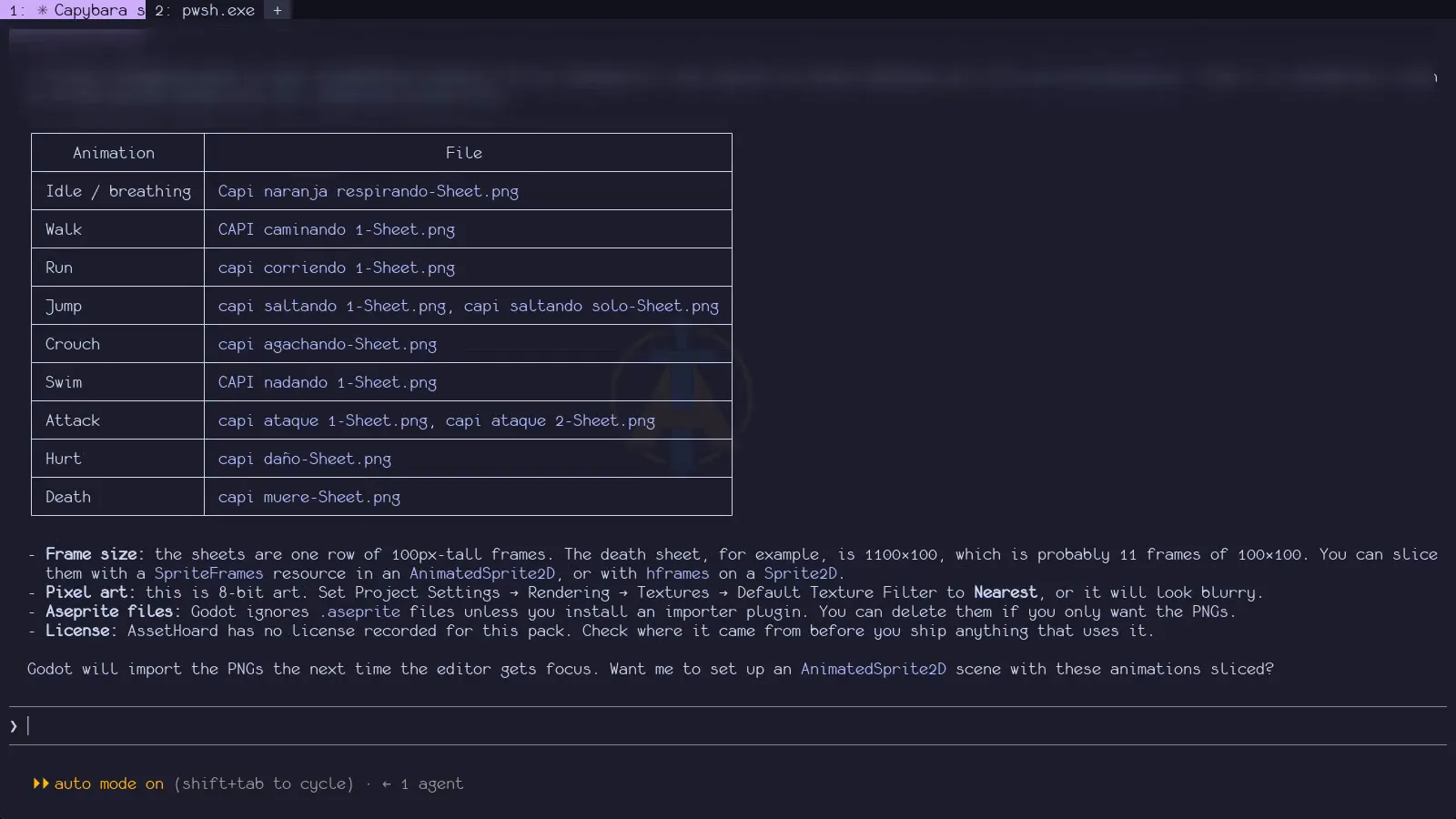
You’re in Cursor, wiring up a dungeon level, and you need a mossy stone wall texture. You know you bought one. It’s somewhere in a 30 GB pile of packs from three bundle sales, under a name like T_Wall_03_final. Normally that means leaving the editor and guessing in a file browser. AssetHoard’s latest release lets you ask the assistant in your editor instead.
AssetHoard 0.2.3, released on 8 October, adds a built-in MCP server. MCP (Model Context Protocol) is an open standard that lets AI assistants call tools in other apps. With the server on, an assistant in Claude Code, Cursor, VS Code (Copilot agent mode), Windsurf or Claude Desktop can search your AssetHoard library, look at previews and copy assets into a project folder.
What the assistant can do
Read and export, by default
Turning on the server gives the assistant read-only tools. It can search by name, with typo tolerance, and by meaning if you’ve enabled AssetHoard’s semantic search. Results can be filtered by file type, engine, tag, category or bundle, and come back 50 at a time with thumbnails and details. Each result carries an assethoard:// link that opens the item in the app.
The assistant can also read an asset’s full details, including the licence you’ve recorded for it. That makes a request like “list the assets in this project with no licence recorded” possible, which is a chore most people put off until launch week.
Export copies assets or whole bundles into a folder you choose, with referenced files included (a material’s textures, for instance). Existing files are never overwritten.
Organise, if you allow it
A second setting, Allow write tools, lets the assistant create and move bundles, add and remove tags, assign categories and build projects. It can also import files and folders, but each import shows a prompt with the path, file count, size and target bundle. No answer within 60 seconds counts as a no.
There’s no tool for deleting assets or bundles. Over MCP, the assistant can only delete categories nobody uses and projects that are empty.
Safety and privacy
According to AssetHoard’s documentation, the server is off by default and only runs while the app is open. It listens on 127.0.0.1, so only programs on your own machine can reach it. Every request needs a 48-character random token, and requests from web pages are refused outright, which stops a malicious site from reaching the server through your browser.
The assistant receives tool results such as names, tags, metadata and previews, not raw file contents, except when exporting to a folder you pick. Every change it makes shows a toast and lands on the undo stack with an “MCP:” prefix, so Ctrl+Z reverses it.
One caveat: what happens to search results depends on your assistant. Names, tags and thumbnails sent to a cloud-hosted model leave your machine as part of that conversation. The asset files themselves stay where they are.
Where it stands on Steam’s AI disclosure
AssetHoard doesn’t generate anything. There’s no AI art and no AI audio, and it never creates new assets. It organises, tags and searches the files you already have, wherever they came from. The MCP server works the same way: it lets your AI tools find and use what’s in your library.
That matters if you sell on Steam. In January, Valve updated its AI disclosure form to say that efficiency gains from AI-powered development tools are “not the focus” of the section. What Valve asks about is AI-generated content that ships with the game, appears on the store page or in marketing, or is generated live during play.
Our reading is that AssetHoard sits in the same bucket as a code assistant. Asking your assistant to find a sprite in your library doesn’t put AI content in your game.
The disclosure follows the asset, not the tool. If you generate art with an AI tool and ship it, Steam wants that disclosed, whether it lived in AssetHoard, a folder on your desktop or anywhere else. Hand-made or bought art stays exactly what it was. A library tool doesn’t change your disclosure either way. It only matters once AI-generated art ends up in a game you ship.
Setting it up
In AssetHoard, open Settings, then MCP Server, and switch on Enable MCP server. The app shows a ready-made config snippet for each client, with the port (47823 by default) and token filled in. Claude Code takes a single command, while Cursor, VS Code and Windsurf each take a short JSON entry. Claude Desktop is the awkward one for now: it connects through a small bridge called mcp-remote, which needs Node.js.
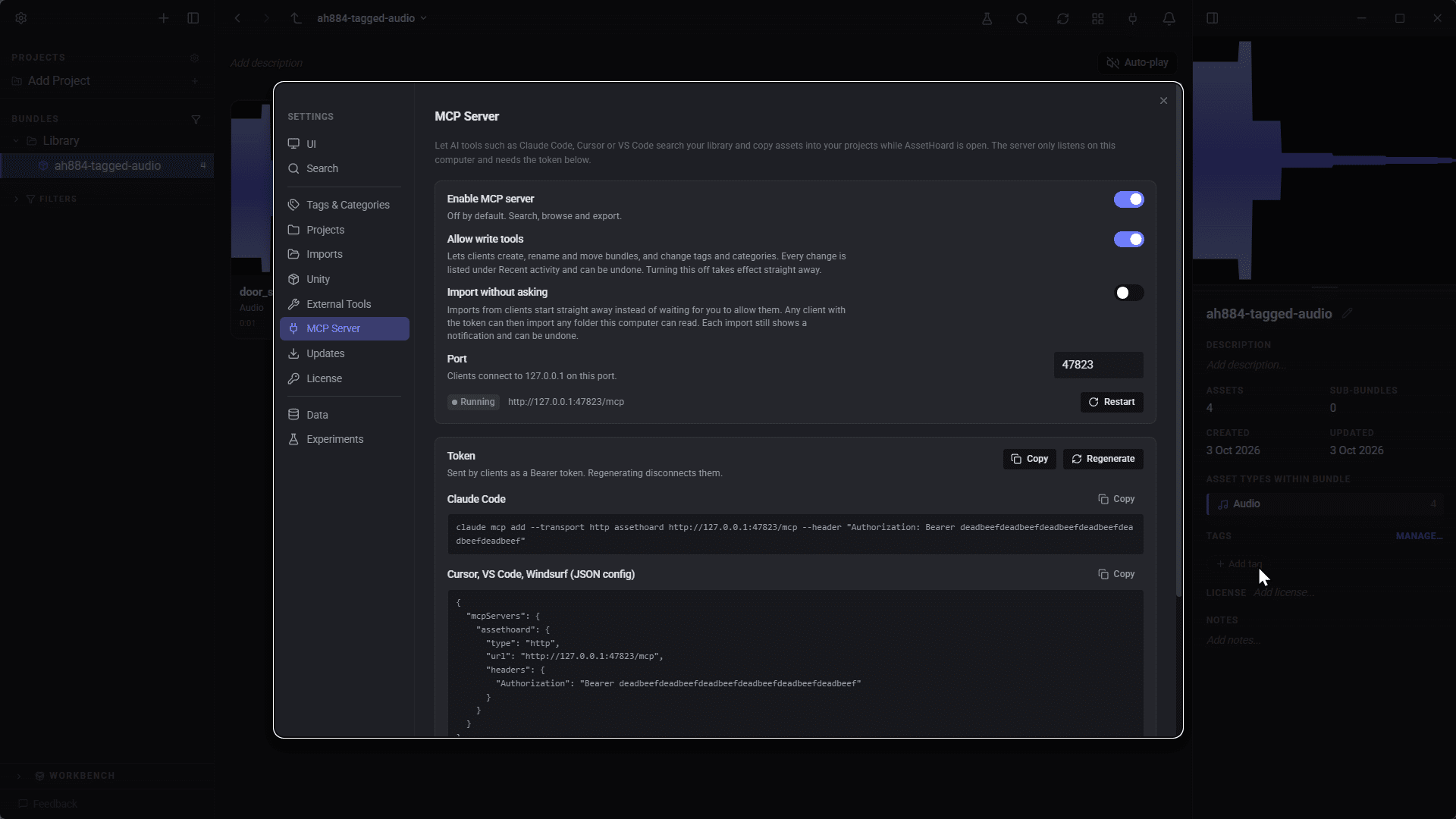
If you plan to use write tools, enable them before your assistant connects, or reconnect afterwards. Imports also need a licence that allows them.
The rest of 0.2.3
The release also reads embedded metadata from WAV, MP3, FLAC and Ogg files and makes it searchable. EXR and HDR files now get thumbnails, previews and image search. Export As gains batch resizing and a crop tool, and undoing a 40,000-asset delete now takes seconds rather than minutes.
What’s missing
The server only works while AssetHoard is running, so it won’t help a build server or a teammate’s machine. Bulk merging or clearing of tags and categories isn’t available over MCP. The release notes don’t mention pricing, or which licences allow imports. AssetHoard is also still in beta, so expect rough edges.
Who it’s for
If you already code with an AI assistant and keep a large asset library, this removes a context switch. If you don’t use AI assistants, nothing changes: the server stays off and AssetHoard works as before.
The real test will come from people using it on actual projects. If you try it, we’d like to hear what the assistant gets right, and where it confidently picks the wrong barrel.
Disclosure: the people behind indietooling make AssetHoard.
Sources