Write the devlog for yourself first
Devlogs stall when they're written for an audience that isn't there yet. Notes kept for yourself turn into patch notes, store posts and a postmortem later.
You start a devlog in week one. There’s a post about the idea, a post about the prototype and a GIF of the jump finally working. By week five there’s nothing, and the last post apologises for the gap.
The usual cause is the audience. Writing for readers who haven’t arrived yet is hard to keep up, because every post feels like marketing homework and nobody replies. Notes you write for yourself don’t have that problem. You need them, so you keep writing them. With a little structure, the same notes become your patch notes, your store posts and most of a postmortem.
The five-minute habit
End every session with a dated entry. Keep it short and answer three questions:
- What changed?
- What broke?
- What did I decide, and why?
The third one matters most. Six months from now you won’t remember why you dropped the double jump or switched the save format. Future you will want to know, and so will anyone writing about the game.
Keep the notes somewhere you’ll actually open. A DEVLOG.md file in the project repo works well. It sits next to the code, it’s versioned with everything else, and you write it in the editor you already have open. If you prefer a notes app, Obsidian stores everything as plain markdown files, so nothing is locked in.
While the change is still on screen, grab one image. Set up a hotkey once and it costs a few seconds. ShareX on Windows records a screen region straight to GIF. On macOS, Cmd+Shift+5 records a region of the screen. OBS works everywhere, and its replay buffer saves the last stretch of footage after something happens, which is handy for bugs you can’t repeat on purpose. Save the file in a folder named by date and paste the path into the entry.
Tag as you go
Add a tag or two to each entry. Keep the list short so you’ll actually use it:
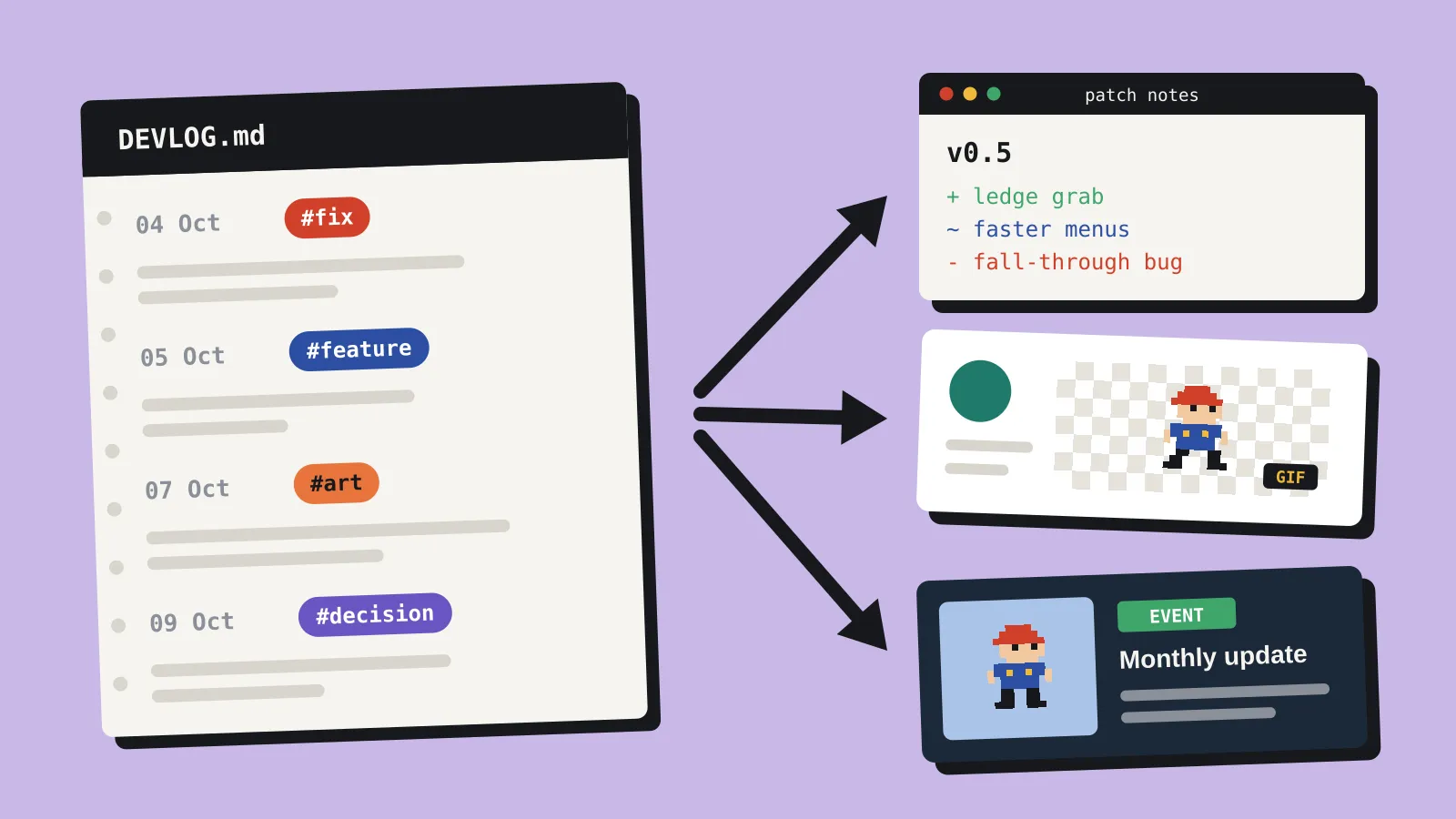
#fixfor bugs you fixed#featurefor things players will notice#artfor visual changes worth showing#decisionfor choices and the reasons behind them
Tags are what make the notes reusable. Without them, you’re rereading three months of entries to write one post.
Turn the notes into everything else
This is where the habit pays you back.
Patch notes. Search for #fix and #feature since your last build and the list is mostly written. Rewrite the wording for players, cut anything internal, and you’re done. We’ve covered keeping release notes honest to what shipped before.
Store and social posts. An #art entry with a GIF is already a post: one image and one sentence about what changed. A month of them gives you an update for your store page, even while the build is still rough.
The posts people read. #decision entries make the best material. Players and journalists like knowing why a game works the way it does. “We cut co-op because the netcode doubled every bug” is a better post than another feature list, and you wrote the first draft on the day you decided.
The postmortem. At launch, your decision log is the outline. You’ll have dates, reasons and screenshots for every turn the project took, instead of a blurry memory of the hard parts.
Publish once a month
When you’re ready to post publicly, do it once a month from the notes. Pick one home and stick to it: itch.io devlogs if your game lives there, Steam events once your store page is up, or your own site if you have one. Share the GIFs on social as you go if you like, but keep the monthly roundup in one place so people can follow along.
The monthly post takes about half an hour, because you’re editing rather than writing from scratch. Skip a month and nothing is lost. The notes are still there, and next month’s post gets a little longer.
Start today with a blank DEVLOG.md, today’s date and three answers. There’s more from the Tools desk in Tools.