GOG Galaxy is coming to Linux in 2027. Check your Linux build
GOG's rebuilt Galaxy client will run on Linux next year. If you sell on GOG, here's what that changes for your Linux build and what to fix first.

GOG used its first big online presentation, on 5 November, to confirm that a rebuilt GOG Galaxy client is coming to Linux in 2027. Galaxy, GOG’s launcher, has never run on Linux. The new version also replaces the current Windows and macOS clients, which GOG says are now simpler and faster and show your library more cleanly. Beta sign-ups are open through a short form linked from GOG’s announcement. If you already sell on GOG, or you’ve been putting off a Linux build, this is a good time to check it.
What GOG announced
GOG describes this as a new Galaxy release for all three platforms. GOG first told GamingOnLinux in July that it was working on Linux support. At the time, joint CEO Krzysztof Papliński said Linux was one of the things its community asked about most, and that GOG had hired a specialist for the job. The November presentation turned that into a 2027 target.
Galaxy stays optional. GOG says players can still download offline installers from their library and keep them, which has always been GOG’s pitch against other launchers. GOG also announced GOG Social, a community space with threaded replies, screenshots, video and polls, and no algorithmic feed. It’s in beta too.
What GOG hasn’t said yet matters just as much. It hasn’t said whether Galaxy on Linux will be a native app, which distributions it will support, or whether it will launch Windows-only games through a compatibility layer such as Proton or Wine. There’s no beta date either. PC Gamer points out that Galaxy 2.0 never left beta on Windows, so treat “2027” as a target, not a promise.
Why Linux keeps getting bigger
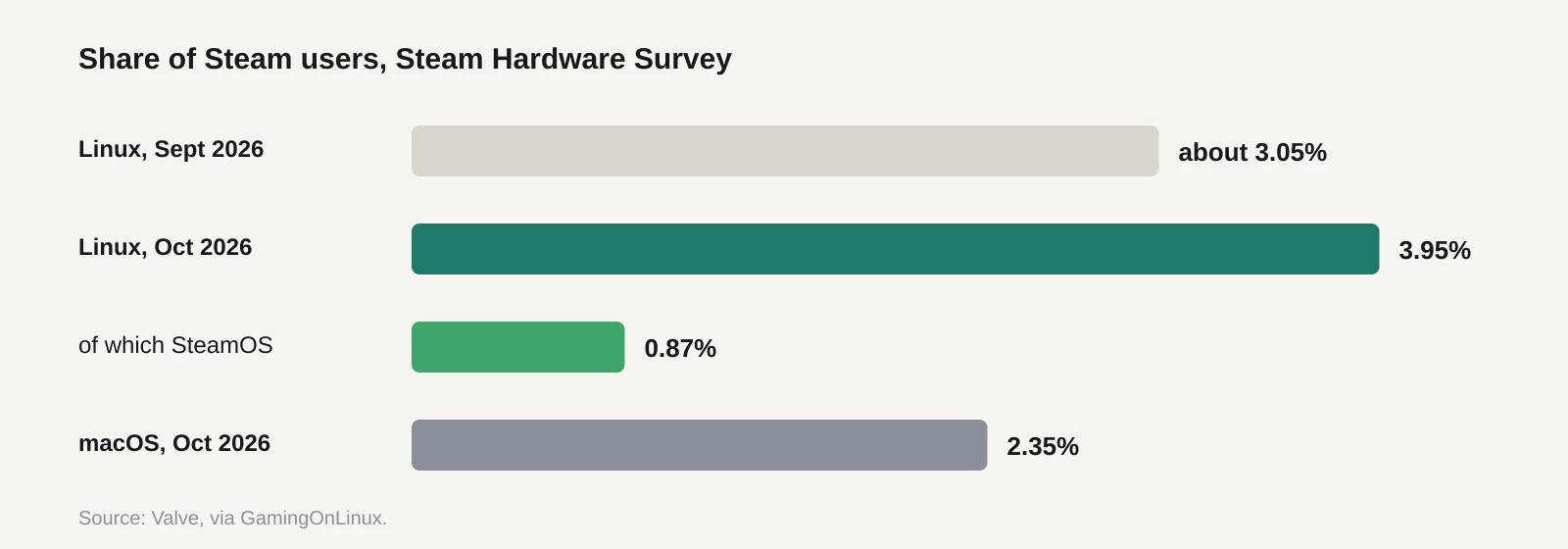
Valve’s October 2026 hardware survey put Linux at 3.95% of Steam users, up from about 3.05% in September. That’s ahead of macOS at 2.35%. SteamOS, the system on the Steam Deck and Steam Machine, accounts for 0.87% of all users, or about 22% of the Linux share. Steam, the Epic Games Launcher and now GOG Galaxy will all have a Linux story.
Most of those players run Windows games through Proton on Steam. GOG’s Linux players have had a rougher time. They could download native Linux builds from the web store, but there was no official client for updates, cloud saves or achievements. A Linux Galaxy could close that gap, and it would make a native Linux build on GOG more visible than it is now.
What it means for a solo dev or small team
If your game is on GOG with a Linux build, this is good news, and you don’t need to do anything yet. Your Linux players will probably get a proper client for updates instead of downloading installers by hand.
Linux players also tend to be loud about support, in a useful way. They file detailed bug reports and they recommend games that run well. A small, working Linux build can earn more goodwill than its sales share suggests. A broken one earns the opposite, and it’ll show up in your reviews.
If your game is on GOG without a Linux build, the question is whether to make one. GOG has sold native Linux builds since July 2014, so this isn’t new permission. What changes is how easy it’ll be for players to use your build. Engines such as Godot, Unity and Unreal can all export to Linux. The cost is mostly testing time, plus the support emails that follow.
There’s one known snag. GOG’s own Linux guidelines say the GOG Galaxy SDK isn’t available on Linux, so a call like IsDlcInstalled() can’t detect DLC there. GOG suggests two workarounds. You can add a small placeholder file for each DLC as its own depot in Build Creator and check for it in-game. Or you can check for the goggame-<dlcID>.info file that GOG’s installer creates. We don’t know yet whether the new Galaxy changes this. If it brings the SDK to Linux, achievements and DLC checks get easier.
What to do now
- Read GOG’s Linux guidelines. They’re short and specific. Build for 64-bit, because a 32-bit-only build may not start at all. GOG suggests testing on clean installs of Ubuntu LTS releases.
- Bundle your libraries. Ship everything your game needs and set the runpath to
$ORIGIN, or use a launch script that setsLD_LIBRARY_PATH. Bundle your own copy of SDL rather than relying on the system’s, and don’t statically link it. - Package on Linux, not Windows. Archives made on Windows lose the executable bit on your binaries and scripts, and the game won’t launch.
- Test non-English locales. C# and Unity games can break when the decimal separator changes, which shows up as missing textures or failed loads. Use locale-independent number formatting, or set
LC_ALL=Cin your launch script. - Watch for Wwise on Unity. GOG says
libAkSoundEngine.sohas a hidden SDL2 dependency. Without SDL2 you can get a black screen. - Handle DLC detection yourself for now. Use one of GOG’s two workarounds until the new Galaxy’s SDK support is confirmed.
- Sign up for the Galaxy beta. Install your own game through it on Linux once access opens. Your players will see that experience, so you should see it first.
If you sell on Steam too, the same native build serves Steam Deck owners who prefer native over Proton. But test it on a Deck before you tick the box. A native build that runs worse than Proton is a support headache.
We’ll come back to this when GOG publishes developer documentation for the new client, or when the Linux beta opens.
Sources
- A new GOG Galaxy is coming in 2027 with full Linux support (GamingOnLinux)
- GOG announces its Galaxy client is getting a revamp headed to Windows, macOS and Linux (PC Gamer)
- Linux guidelines (GOG documentation)
- GOG confirm they are working towards GOG Galaxy on Linux (GamingOnLinux)
- Steam survey October 2026 shows an uptick for the Linux user share (GamingOnLinux)
- Steam Hardware and Software Survey (Valve)
- GOG now officially support Linux games, July 2014 (GamingOnLinux)
- GOG Showcase 2026 recap (Out of Games)