SteamOS 3.9 is out. Here's what to retest in your game
Valve's latest stable SteamOS moves to Linux 7.2, fixes frame limiting and suspend bugs, and makes it easier to test in a virtual machine.
Valve released SteamOS 3.9 to every user on the stable channel on 23 October 2026. The build number is 3.9.5, but Valve markets it as 3.9 because the notes cover everything since SteamOS 3.8. It rebases the system on Linux 7.2, updates Desktop Mode to KDE Plasma 6.7.3 and fixes a long list of bugs on Steam Deck, Steam Machine, Lenovo’s Legion Go 2 and recent Intel and AMD hardware.
Most of the changes sit below your game. A few of them change how it runs, though, and one makes testing on SteamOS easier if you don’t own Valve hardware.
What’s in SteamOS 3.9
Here’s the short version of Valve’s notes, grouped by what a developer would care about.
System base. The Arch Linux base is updated and the kernel is rebased on Linux 7.2. Valve also renamed many SteamOS scripts and packages from “steamos-” to “holo-”, keeping aliases for the old names. Linuxcompatible reads that as groundwork for running SteamOS on hardware Valve doesn’t make.
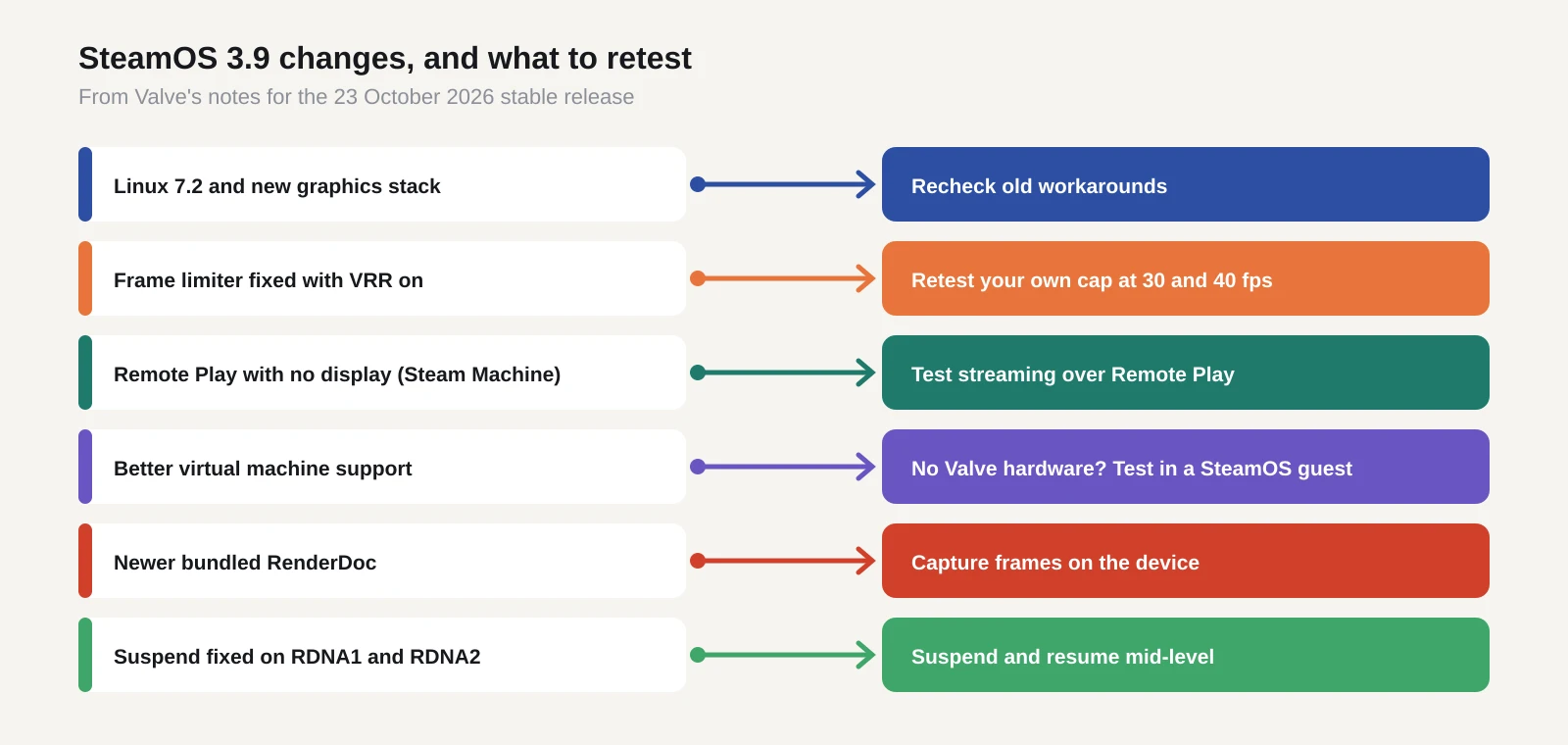
Game Mode fixes. The “Disable Frame Limiter” toggle now works when variable refresh rate (VRR) is on. Frame limits on some external displays no longer give you a lower frame rate than you asked for. Dragging a launcher window by accident no longer kills input.
Steam Machine and Steam Frame. Remote Play now works when a Steam Machine boots with no display attached. The frame limiter no longer applies to VR games streamed to Steam Frame, Valve’s headset, and the Frame’s wireless adapter connects more reliably.
Other hardware. ELDEN RING and DARK SOULS III failed to start on Intel’s new Panther Lake chips. That’s fixed. Suspend and resume work again on PCs with AMD RDNA1 or RDNA2 graphics cards. The Legion Go 2 gets a crash fix for Forza Horizon 6 and early brightness control.
Developer items. SteamOS now runs better as a guest in a virtual machine, with accelerated graphics through virtio-gpu and Venus (a way of passing Vulkan from the VM to the host GPU). The bundled RenderDoc, a free graphics debugger, is a newer version. Android binder IPC support is back, a piece of plumbing used by Android compatibility layers.
Power and sleep. Steam Deck uses less power at idle when no audio is playing. Valve gives no figure. There’s early support for hibernation, but it isn’t in the Game Mode menus yet and stays off on Steam Deck because of a driver bug.
Why it matters for a small team
Valve’s survey has Linux at about 4% of Steam users, ahead of macOS. A large slice of that is SteamOS. If your game is Verified or Playable on Steam Deck, every one of those players just moved to a new kernel and a new graphics stack.
That’s usually good news. Kernel and driver updates bring fixes you didn’t have to write. But it also means any workaround you shipped for an old bug might now be the thing causing trouble. If you added a frame cap in your own code to dodge the old VRR limiter bug, check it still behaves.
The frame-limiter fixes deserve a test of their own. Players on Steam Deck often cap games at 30 or 40 frames per second to save battery. If your game has its own frame pacing, the interaction between your cap and SteamOS’s cap has changed. A game that felt smooth in September could judder now, or the other way round.
Steam Machine is the new one to think about. It’s a living-room PC that boots straight into Game Mode, often on a TV. That means controller-first UI, 4K or 1080p output and a couch-distance text size. The Remote Play fix also means more players will stream from a Steam Machine with no screen attached, so test your game over Remote Play if you haven’t.
If you already use Proton (Valve’s Windows compatibility layer) rather than a native Linux build, none of this changes your build process. It does change the environment your Windows build runs in.
What to do now
Update a test device first. On a Steam Deck, go to Settings, then System, then System Update. If you have one in a drawer, put it on the stable channel so it matches what players have.
Run your usual Deck checklist again. Boot to the menu, play the first 20 minutes, suspend and resume mid-level, and try the frame-limiter toggle with VRR on and off if you have an external VRR display. Watch for input problems in launcher windows if your game uses a separate launcher.
No Valve hardware? The improved virtual machine support is worth a look. Running SteamOS as a guest with accelerated graphics won’t match a real Deck for performance, but it’s enough to catch crashes, missing dependencies and controller-UI bugs before players do. Valve hasn’t published a step-by-step guide we could find, so expect some setup time.
Use the new RenderDoc build if you’re chasing a graphics bug that only appears on SteamOS. Capturing a frame on the device itself is often faster than guessing from player reports.
Check your store page and Deck compatibility notes. If you list known issues with suspend, VRR or external displays, some of those may now be fixed. Retest before you remove them, then update the notes so players aren’t put off by old warnings.
Last, think about Steam Machine before it shows up in your reviews. A controller-only playthrough on a TV, from launch to the first save, will show you most of the problems.
Coming next
The Steam client itself updates separately from SteamOS. Linuxcompatible reports that a 64-bit Linux Steam client is on the Beta and Preview channels, and Valve has already moved the Windows client to 64-bit. Hibernation is also waiting on a driver fix before it reaches Steam Deck. We’ll cover both when they reach the stable channel.
Sources
- SteamOS 3.9, Steam Deck news (Valve)
- Valve rolls out SteamOS 3.9.5 stable update to all users (Gaming.net)
- SteamOS 3.9 update ships with Linux 7.2, Plasma 6.7.3 and idle battery boost (Linuxcompatible)
- SteamOS 3.9 reaches all users with lower Steam Deck idle power use (MIXED)
- SteamOS 3.9.3 beta improves Steam Frame wireless adapter support (GamingOnLinux)
- Valve working on SteamOS for general release (Tom’s Hardware)
- Steam app is now 64-bit only on systems that support it (Tom’s Hardware)