Unity and Unreal now let AI agents into your asset library
Unity's experimental Asset Library pulls single assets out of packs, and Unreal 5.9's Fab toolset lets agents install purchases. Your licences still apply.
Unity and Epic both changed how you get at the store assets you already own this month. On 23 November 2026 Unity put its Asset Library plug-in into open beta. It imports one model or sound from a pack instead of the whole pack, and its command-line version is built for coding agents. Unreal Engine 5.9 Preview 2 ships a Fab toolset for Unreal MCP that lets an agent search Fab, browse your library and install free or purchased assets. Neither change touches the licence you bought, so it helps to know which rules come along for the ride.
What Unity shipped
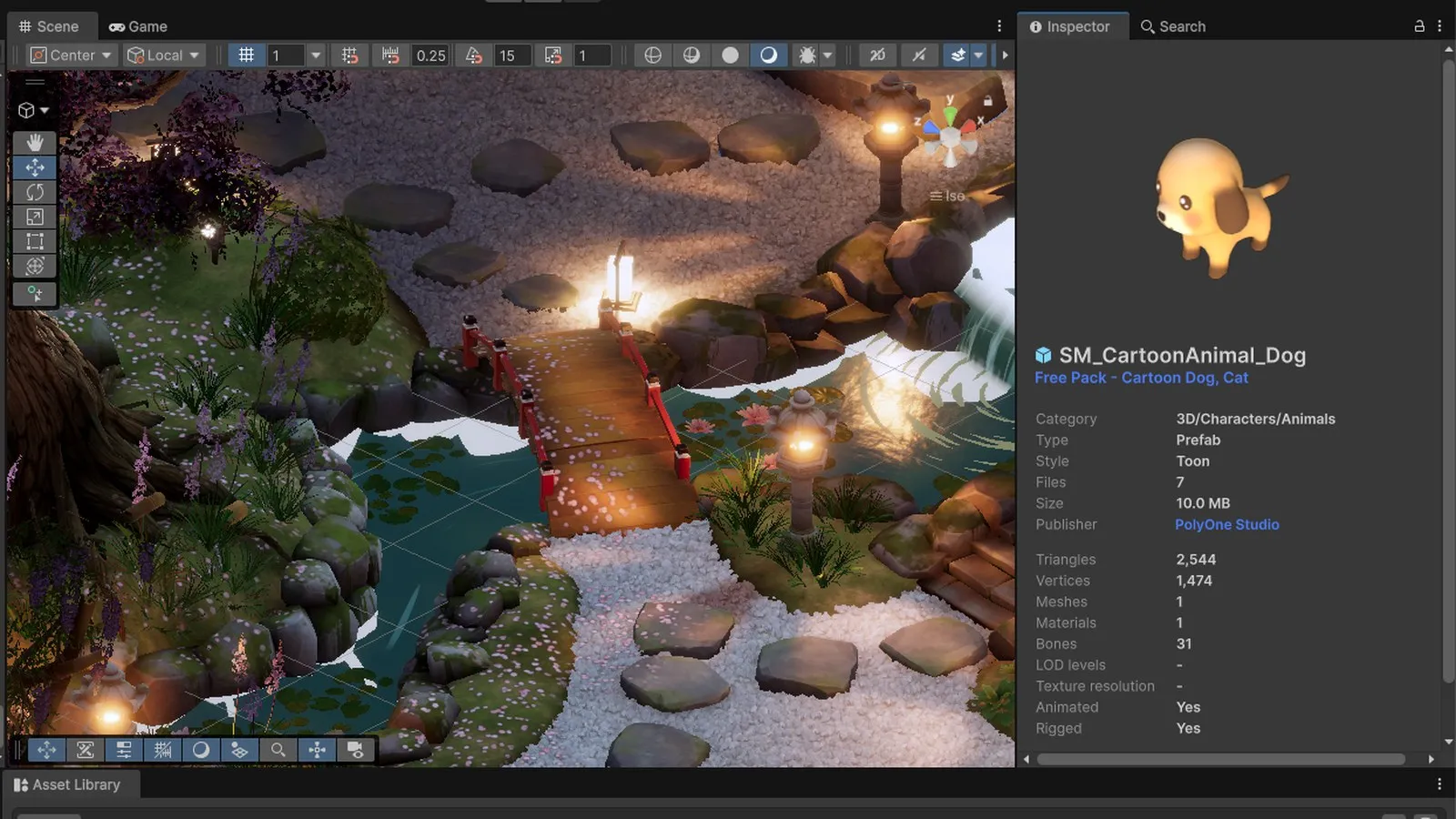
The Asset Library plug-in is a Package Manager package called com.unity.asset-library. It needs Unity 6.0 or later, a Unity account signed in to the Editor, and a project linked to a Unity Cloud project in your organisation. Once installed, it adds an Asset Library window where you search for a single asset and drag it into your scene. Only the files that asset needs get downloaded. Unity’s blog calls this breaking up the old .unitypackage format, so a single barrel no longer means importing a 400-file props pack.
The window also shows data the Asset Store page never did, such as triangle counts and whether a model is rigged. It filters results to assets that work with your project’s render pipeline, and not every asset is there, because publishers can opt out.
The second half is the Asset Library CLI, a plug-in for the Unity CLI run as unity assetlibrary. It has nine commands. search and show work on any asset, free or paid. import, download and package only work on free assets and paid packages you own. There’s no purchase command. Flags such as --format json, --non-interactive and --dry-run exist so an agent or CI script can run it without prompts, and unity skill install hands an agent the instructions. Unity’s blog names Claude Code, Codex, Grok Build and Google Antigravity as agents that can drive it.
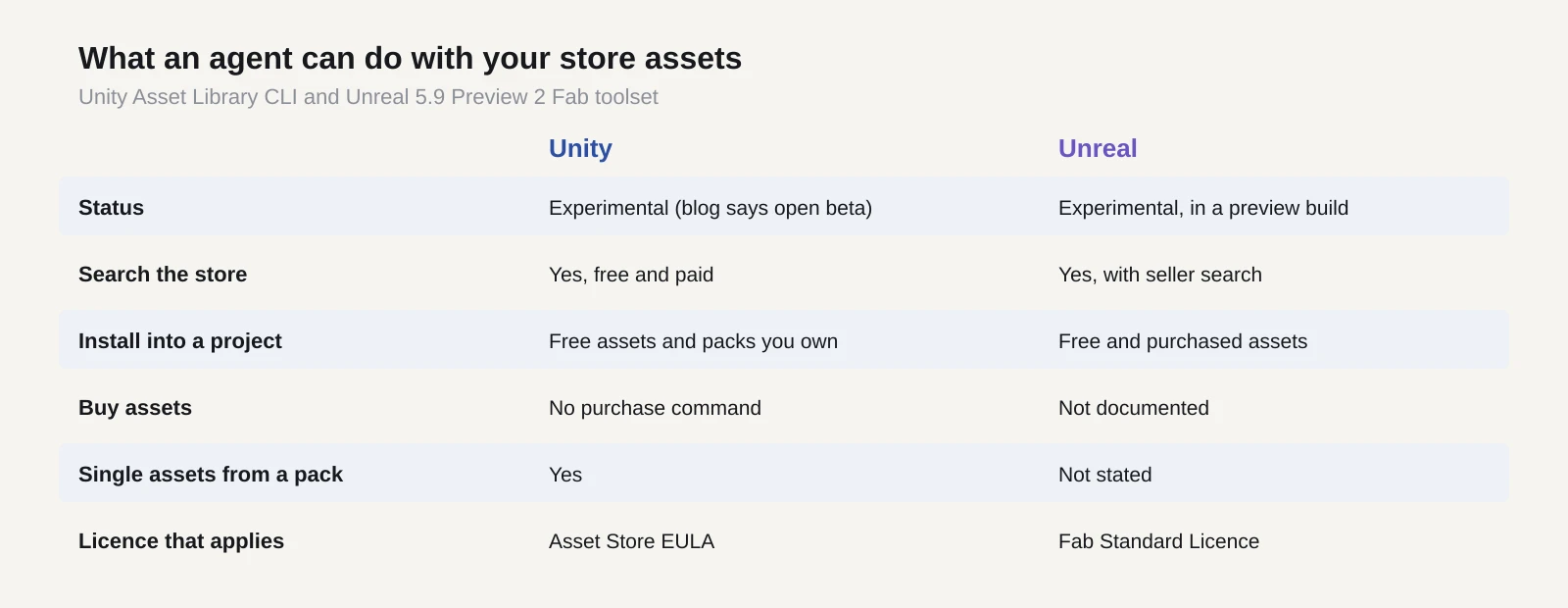
Labels differ by page. The blog says open beta, while the plug-in and CLI docs say experimental and not ready for production. Treat it as experimental.
What Epic shipped in Unreal 5.9 Preview 2
Unreal MCP is the editor’s built-in Model Context Protocol server. MCP is a standard way for an AI agent to call tools inside another app. Epic’s Preview 2 forum post lists a new Fab toolset that searches the catalogue, browses your library and installs assets into a project. The 5.9 release notes add that Preview 2 brought seller search and more search filters to that toolset.
Preview 2 also enables the AllToolsets plugin by default, removes the deprecated MCP Tool Library, and makes the MCP settings findable by searching “MCP” in Editor Preferences or Project Settings. By default the server listens on 127.0.0.1:8000, so only programs on your own machine can reach it. Epic labels Unreal MCP experimental. We covered the other big 5.9 preview change in our piece on web export coming back with a catch.
What it means if you own a lot of packs
If you’ve bought bundles for years, the useful bit is granularity. Most of us own packs where we use 5% of the contents. Pulling a single prefab or mesh keeps your project folder and your version control history much smaller. If you picked up a pile of POLYGON kits before Unity bought Synty, the Asset Library is a cleaner way to cherry-pick from them, assuming those publishers stay opted in.
Unity’s CLI docs say ownership applies to the whole package, so owning a pack covers every asset inside it.
Does an agent touch your licence terms?
Mostly no. How a file reaches your disk doesn’t change the licence, but two things need a look.
Unity Asset Store EULA. The current terms, last updated 4 December 2024, let you install standard assets on any number of your own computers. Editor extensions, scripting and services assets are per seat, capped at two computers. Section 2.2.1.1(g) bans using assets to train an AI or machine learning model without consent from the publisher or Unity. An agent importing a mesh into your scene isn’t training anything. The question is where your files go next. If your agent runs on a cloud model, project files it reads may be sent to that provider, so check its data terms. Also take care with package: it builds a .unitypackage signed for your organisation, and the EULA still bans redistributing assets outside your game.
Unity’s blog makes one more point plainly. When an agent searches or requests a quote, it acts as you, with your entitlements and your spend. Spend here means AI generator credits from your Unity plan, so give an agent access the same way you’d hand over a card.
Fab Standard Licence. Fab’s licence page splits the Standard Licence into a Personal tier, for buyers with no more than US$100,000 in gross revenue over the last 12 months, and a Professional tier above that. The Fab toolset installs what you already hold under whichever tier you bought, so watch that threshold as before. The catch is the NoAI tag, which a seller can set on Standard Licence content. On 13 October 2026 an Epic staff member said on the forums that the Fab EULA wording governs, that NoAI content can’t be used as training inputs to generative AI, and that upscalers typically fall outside that. They didn’t answer whether an MCP coding assistant reading NoAI files is fine, and suggested legal advice if in doubt. Our earlier note on checking the licence on Fab bundles and UEFN kits applies here too.
What to do now
- If you’re on Unity 6, install
com.unity.asset-libraryin a throwaway project first. It’s experimental, and it needs a Unity Cloud link you may not want in a live project yet. - Run
unity assetlibrary doctorto confirm the CLI sees the right organisation. Ownership is checked through your Unity organisation, so if your purchases sit on a different account, assets may show as unowned. - Use
--dry-runbefore letting an agent import anything, and pin versions withassetId@versionIdso repeat runs pull the same files. - On Unreal 5.9, leave the Fab toolset in a test project until 5.9 ships as a full release.
- Before you point any agent at your library, read your AI provider’s data terms. Note which Fab assets carry the NoAI tag.
- Export a list of what you own from both stores. Store features change, and a record of your licences is cheap insurance.
For how the two engines compare on licensing and royalties more broadly, see the Unity row in our engine comparison.
Sources
- Unity Asset Store and CLI: let your AI agent find and add assets, Unity blog
- Asset Library Editor plug-in, Unity documentation, source of the cover screenshot
- Asset Library CLI introduction, Unity documentation
- Asset Library CLI command reference, Unity documentation
- Asset Store Terms of Service and EULA, Unity
- Preview 2: Unreal Engine 5.9 Preview, Unreal Engine forums
- Unreal Engine 5.9 release notes, Epic Games
- Unreal MCP in Unreal Editor, Epic Games
- Licences and pricing in Fab, Epic Games
- NoAI content: inputs or training inputs?, Unreal Engine forums
- Unity and Unreal change the way you access assets, GameFromScratch